

Biophilic gaming setup isn’t just a buzzword anymore—it’s an evidence-backed upgrade unlocking better focus, less visual fatigue, and serious aesthetic swagger for anyone gaming for hours on PC or console. If you want a space that calms you down, supports peak performance, and still feels sleek, here’s what you need to know (plus actionable, science-based steps).
Key Takeaways
- Integrating nature into your gaming setup measurably reduces tension, visual fatigue, and boosts attention span—optimal results come from moderate “green” integration, not maximal plant density.
- Right materials and low-maintenance plants like Epipremnum aureum, Chlorophytum comosum, and walnut desks deliver health benefits without interfering with your tech or cluttering your space.
- Avoiding common mistakes (mold, glare, allergies, poor cable management) is just as important as going green—follow actionable steps for a sustainable, high-performance, and uniquely aesthetic battle station.
- Why Go Biophilic? The Science Behind Green Gaming Setups
- Core Elements: Key Materials and Plant Choices for a Nature Gaming Room
- From Standard Rig to Organic Battle Station: Steps, Tech, and Realistic Budgeting
- Pitfalls to Avoid When Going Green: Maintenance, Lighting, and Health Hazards
- Underexplored: Tech–Nature Integration and Aesthetic Cohesion Tips
- FAQ
Why Go Biophilic? The Science Behind Green Gaming Setups
Decades of digital grind have left gamers searching for real relief from dry eyes, stress, and mental fatigue. 2024 research confirms that a biophilic gaming setup—think actual plants, wood textures, and earthy color motifs—delivers measurable benefits to gamer wellbeing and performance.
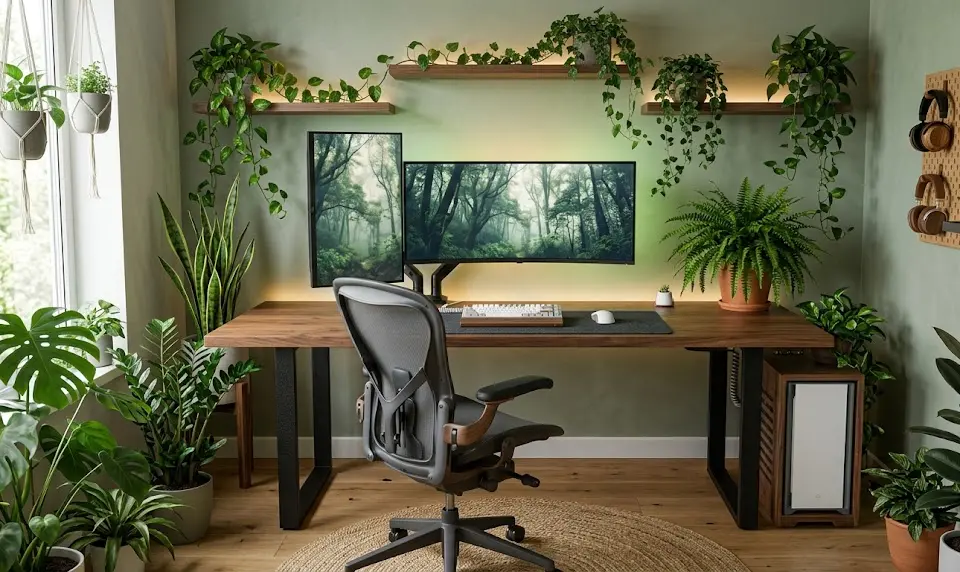
Studies show that after just an hour in a “green wall” gaming space (twelve vicks plant pots arranged in the room), gamers had lower tension and fatigue scores, higher vigor, and increased alpha‑wave power—a biomarker for relaxed, sustained visual focus. Stress markers like heart rate, skin conductance, and salivary cortisol all dropped, while inflammation signals decreased too. (Dayhouse Studio, 2024)
But there’s nuance: too many plants or over-layered nature cues (sound, water, visuals) can actually distract, raise arousal, and backfire for high-intensity gaming. Optimum biophilic gaming isn’t about excess greenery—it’s about balanced, thoughtful setup.
Beyond stress and fatigue reduction, integrating natural elements is linked with improved cognitive function on complex tasks, enhanced air freshness, and increased subjective room “comfort.” (Frontiers in Virtual Reality, 2025)
For those battling marathon sessions and digital eye strain, the case for a green gaming setup is more than style—it’s science-backed strategy.
Core Elements: Key Materials and Plant Choices for a Nature Gaming Room
The best biophilic setups are low-maintenance, space-conscious, and use materials and plants proven not to mess with airflow, screens, wires, or your budget.
- Desk Material: A solid walnut gaming desk is ideal—sustainably sourced, tactile, and less prone to VOC off-gassing or scratches than cheap laminate. Walnut’s dark, rich finish also hides dirt and matches most RGB setups.
- Plants for Gamers: Stick with resilient, air-purifying species that won’t shed aggressively or need constant babysitting. 2024 research backs this shortlist (PMC, 2024):
- Epipremnum aureum (Pothos) – Hardy, great for shelves.
- Chlorophytum comosum (Spider Plant) – Compact, handles neglect.
- Nephrolepis exaltata ‘Bostoniensis’ (Boston Fern) – Rich foliage, needs occasional misting.
- Tradescantia fluminensis ‘Quadricolor’ – Colorful vines, easy propagation.
- Fittonia albivenis (Nerve Plant) – Stripey leaves, best for shaded corners.
- Accessories: Sustainably sourced wool desk pads, bamboo monitor risers, and recycled-fiber organizers nail the “organic battle station” vibe.
- Lighting: Natural daylight is king, but supplement with full-spectrum LED monitor light bars for eye comfort; see our monitor light bar gaming setup guide for gaming-specific picks.
Keep plant placement strategic: don’t crowd air intake for consoles or PCs, and avoid soil-filled pots directly beside sensitive gear. Build up—use wall shelves, hanging planters, or high corners—so your nature gaming room feels breathable, not boxed-in.
Ready to coordinate aesthetic with performance? Pair earth-toned surfaces and subtle greenery with your favorite RGB gaming accessories for a harmonized look.
From Standard Rig to Organic Battle Station: Steps, Tech, and Realistic Budgeting
Upgrading from a typical desk-and-monitor to a true organic battle station requires a plan. Here’s how to go green without blowing your wallet—or cluttering your gameplay zone.
- Assess & Declutter
- Pull everything off your desk. List which gaming tech you use daily vs. rarely. Only keep essentials within arms’ reach.
- Define Budget
- Mid-tier walnut gaming desks start at $250–400. Three to five quality plant pots (with substrate and hangers) cost $10–$30 each.
- Remember: Top research shows that doubling plant count has no added benefit—stick with one modest cluster on desk or shelves.
- Pick & Place Plants Smartly
- LED grow bulbs or an east-facing window expand plant choice. Avoid species needing constant sunlight if your gaming den is a basement or has blackout curtains.
- Wall mount or hang trailing plants to open up desk real estate and streamline cables.
- Integrate Organic Surfaces
- Bamboo or wool desk mats protect wood and anchor the natural palette. Add a recycled glass carafe for hydration—and another subtle visual “green” cue.
- Cable Management & Stealth Setup
- Pick modular cable trays, attach to desk underside, and route power strips away from direct soil/water sources. Consider programmable mechanical keyboards with short, detachable cables for a cleaner look.
- For stealth setup, stick to wireless peripherals where possible—see also over ear headphones for gaming that cut wires from your desk and blend into softer, organic colorways.
- Optimize Lighting
- Aim for soft, full-spectrum LED bias lighting behind monitors. Avoid cold blue-white bulbs, as these clash with natural textures and strain eyes. Our monitor light bar guide can help reduce glare and fatigue.
- Final Touches
- Scatter stones, driftwood, or other tactile organic objects as decor. Choose natural-fiber throw pillows if your chair allows, but see our ergonomic gaming chair guide to get honest about when function trumps “all natural.”

Real-world cost? Expect about $300–$600 to transform a mid-sized gaming zone, not including PC/console upgrades. Sustainability payoff is long-term—less plastic, fewer disposable accessories, and improved day-to-day wellness. Want more inspiration? See full gaming setup essentials or explore scorpion gaming setup trends for high-tech/organic fusion examples.
Sneaky upgrade: Some gamers add a “tree per win” routine—planting or donating with each game victory for ongoing impact (Ecofreek, 2024).
Pitfalls to Avoid When Going Green: Maintenance, Lighting, and Health Hazards
Not every green gaming setup is a win. Here’s where most enthusiasts trip up, and how to stay clear of rookie mistakes:
| Common Pitfall | Impact | Prevention & Fix |
|---|---|---|
| Overwatering & mold | Air quality drops, musty smell | Use fast-drain pots, water once roots dry, never let trays stagnate |
| Pest attraction (fungus gnats, mites) | Spread to gear, impact electronics | Choose sterile substrate, inspect new plants, sticky traps if needed |
| Glare from leaves or pots | Eye strain, reduced monitor clarity | Position plants off to the side, use matte/glazed pots, opt for low-gloss leaves |
| Plant allergies | Sneezing, headaches, discomfort | Use hypoallergenic species, avoid flowering plants, check reactions early |
| Poor sunlight | Plant browning or death | Add affordable LED grow lights, rotate plants weekly |
| Clutter/ergonomics interference | Disrupted mouse/keyboard use, posture slouch | Mount plants above or behind screens, keep main desk clear—see also monitor light bar tips and ergonomic mouse picks for clean desk ideas |
Practitioner reports and academic studies consistently call out these barriers—maintenance lapses and ergonomic oversights can negate or even reverse the intended wellness gains (Frontiers in Virtual Reality, 2025).
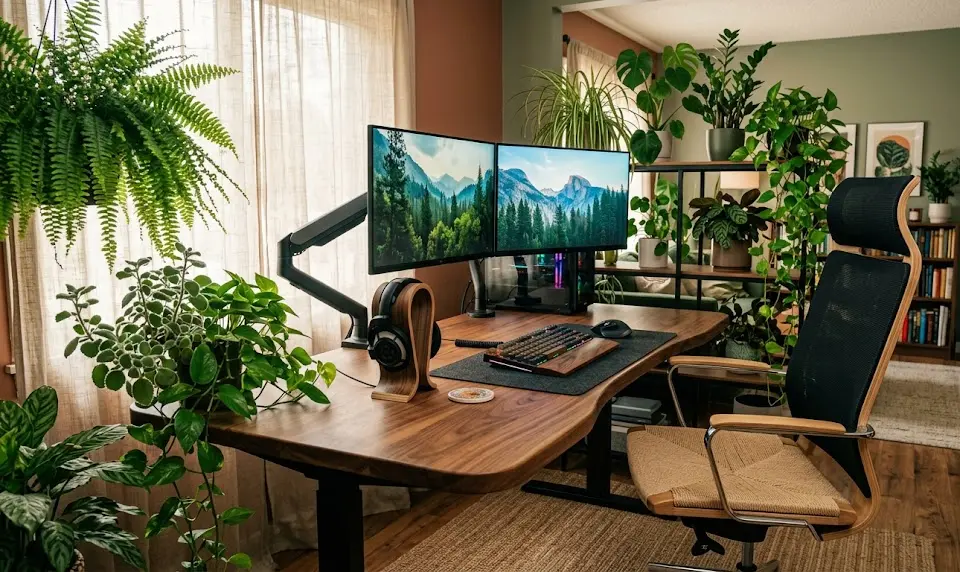
The fix is to start slow: add one or two plants, monitor for side effects, then expand. Blend in setup tweaks—like an RGB LED keyboard or wireless gaming earphones—to avoid unnecessary surface clutter.
Prioritize health over maximal visual “greenness” for the most sustainable and comfortable upgrade.
Underexplored: Tech–Nature Integration and Aesthetic Cohesion Tips
Many guides stop at listing plants or recommending wood desks; few deliver on seamless integration with gaming hardware. Here’s how to make a stealth setup where tech and nature work in sync—no visual chaos, no usability losses:
- Pick Peripheral Colors Wisely: Choose keyboards, mice, and headsets (see the precision gaming mouse guide) in muted tones—think sage green, graphite, or walnut brown—to mesh with organic finishes.
- Match RGB Lighting: Set RGB strips and feature lighting to warm whites, greens, or natural-cycle color patterns. This avoids jarring contrasts and preserves the room’s mood. For elite tweaks, see our RGB gaming accessories recommendations.
- Position Tech for Natural Flow: Mount monitors slightly higher to allow trailing plants underneath. Use vertical monitor arms so cables stay invisible. Try a monitor light bar that casts soft, indirect light upwards and away from leaf glare.
- Wall Decor & Visual Anchors: Hang framed nature prints, moss wall panels, or sound-diffusing wooden slats for visual depth and acoustic control.
- Get Real User Feedback: Join communities or browse real-world showcases to see what layouts actually work for gamers—not just what looks good in ads. Hybrid examples are featured in our gaming setup essentials checklist and future-proofed DLSS 5 gaming guides.
Small touches like incorporating glass terrariums with RGB base lighting or using wireless charging pads disguised as stone or wood “coasters” create useful, harmonious tech–nature blends. Layer function and form—never sacrifice vision, posture, or gaming performance for aesthetics.
Most importantly, update your setup gradually. Users report that iterative builds (space, plant, lighting, cable, color) yield more ergonomic and sustainable rooms than one-off, overhaul spends (Dayhouse Studio, 2024).
FAQ
What are the real benefits of a biophilic gaming setup?
Short-term exposure to green gaming spaces measurably reduces tension, visual and mental fatigue, lowers stress hormones, and increases attention and gaming stamina. Optimal results come from balanced plant and material choices.
Which plants are best for low-maintenance gaming setups?
Epipremnum aureum (Pothos), Chlorophytum comosum (Spider Plant), Boston Fern, Tradescantia fluminensis ‘Quadricolor’, and Fittonia albivenis are excellent, low-fuss options that won’t shed heavily or die if you skip a week of care.
How do I prevent mold and pest issues in a nature gaming room?
Use fast-draining soil, never overwater, and inspect new plants for bugs before introducing them to your setup. Stick to sterile potting mixes and clean up fallen plant debris regularly to deter pests and mold.
Will too many plants hurt my gaming performance?
Yes—studies show that excessive plant density can distract, increase mental workload, and harm rapid visual processing. Stick to a moderate number of plants, ideally clustered out of your direct sightline.
How can I achieve aesthetic harmony between tech gear and natural elements?
Choose peripherals and lighting in earthy or muted shades, use indirect or bias lighting, and mount greenery away from screens and controls. Look for wireless or ultra-low-profile tech to keep surfaces clear.
Conclusion
A biophilic gaming setup can transform your play, health, and room vibe without trading function for flair. Add the right plants, pick sustainable materials, and fine-tune placement and lighting for proven benefits—reduced eye strain, more relaxed focus, and a space you’ll actually enjoy. Just remember: Go gradual, avoid clutter, and harmonize nature with tech—so your upgrade truly levels up both wellness and gaming performance. Ready to rethink your battle station? Start with a single plant, a new organic desktop surface, or a swap to wireless gear, and experience the shift. For more inspiration and gear picks, explore our gaming setup essentials guide.
